Find it
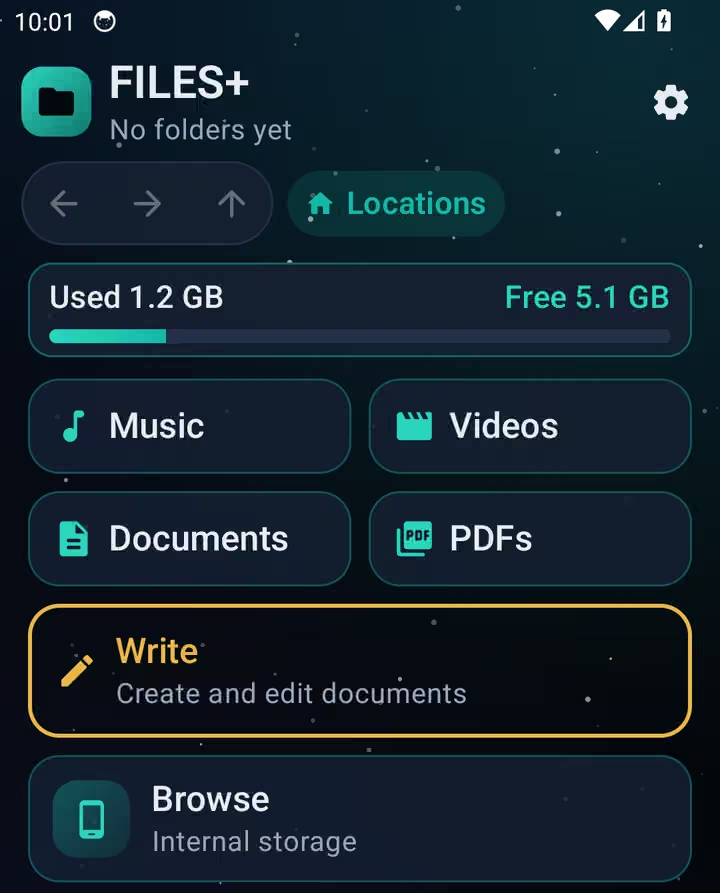
Browse folders or search by name. Home tiles collect music, videos, documents, and PDFs from the folders you added.
by StellarTimeLock
FILES+ is a simple file manager for Android. Search or browse your folders, tap a file, and view it in the app — photos, PDF, xlsx, video, music, and more. No account. No ads.
Coming soon to Google PlayOne-time $9.95 unlock. The Google Play build uses the folders you pick. It does not ask for all-files access.
Probably the best Android file manager ever built.
Three steps. That is the whole idea of this Android file manager.
Browse folders or search by name. Home tiles collect music, videos, documents, and PDFs from the folders you added.
Open a file from the list. Photos, videos, and PDFs show thumbnails so the right one is easy to spot.
Stay in FILES+. Built-in viewers cover photos, PDF, text, .xlsx, SQLite, music, video, and zip archives.


FILES+ is intentionally a basic file explorer: fast to scan, easy to move around, and private.
Open folders all the way down. Tap any breadcrumb. Back, Forward, and Up sit next to the path, like a simple browser for your files. Each folder remembers where you scrolled.
Search by name in the current folder and everything below it. Exact names rise to the top. Or skip the hunt: home tiles list music, videos, documents, and PDFs across the folders you use.
Folder lists show a small picture for photos, a frame for videos, and the first page of a PDF. You see the file, not just a name.
The usual file-manager jobs are included. Open with another app is still there when you want it. Sort by name, date, size, or type.
Tap a file and FILES+ opens it. Pictures and archives open right away. Music, video, documents, PDFs, text, spreadsheets, and databases open in the app after a one-time $9.95 unlock on Google Play.
Pinch to zoom. Swipe the other pictures in that folder. JPG, PNG, WebP, GIF, HEIC, and more.
Read pages in the app. Pinch to zoom and pan. No extra PDF reader required.
Open an Excel .xlsx file on your phone as a read-only grid, with sheet tabs, column letters, and row numbers.
Read notes, logs, and other text files right in the file manager.
Open .db, .sqlite, and .sqlite3 files. Pick a table, then scroll rows. Read-only — no SQL console.
Play a track in the app. Pause, scrub, and control it from the notification.
Play a video on Android without sending it somewhere else. Play, pause, and scrub.
Open .zip, .tar, and .tar.gz / .tgz. List what is inside, then extract here or to a folder you pick.


Docs, sheets, slides, PDFs, photos, video, music and archives open inside the app, plus hundreds more: 690+ extensions in all. If a phone can't open a file, FILES+ tells you what it is and which app you need, with Open with another app one tap away.
| Documents | .docx.doc.odt.rtf.txt.md.pages.wpd |
|---|---|
| Spreadsheets | .xlsx.xls.ods.csv.tsv.numbers |
| Presentations | .pptx.ppt.odp.key |
| Photos | .jpg.png.heic.webp.gif.tiff.svg.psd.dng.cr2.nef |
| Video | .mp4.mkv.webm.mov.avi.3gp.m3u8 |
| Music | .mp3.m4a.flac.wav.ogg.opus.mid |
| Archives | .zip.7z.rar.tar.gz.bz2.xz |
| E-books and more | .epub.mobi.cbz.eml.vcf.ics.sqlite.stl.ttf.apk |
No account. No ads. No analytics. FILES+ does not collect or share data and does not upload your files. There is no FILES+ server.
Music, video, documents, PDFs, text, spreadsheets, and databases open in the app after a one-time $9.95 unlock on Google Play. Browsing, pictures, archives, and Open with another app work without it. Buy it once and restore it if you reinstall.
Straight answers for people looking for a file manager for Android.
FILES+ is a simple file explorer for the folders you add. Add a folder with the system picker, then search by name through that folder and everything inside it. The Google Play build only opens folders you pick and does not ask for all-files access. Tap a match to open it in the app.
Open FILES+, find the spreadsheet, and tap it. FILES+ has a built-in read-only .xlsx viewer with sheet tabs and a grid (column letters and row numbers). You do not need a separate spreadsheet app. You can still use Open with another app.
Tap the PDF in FILES+. Pages open in the app, and you can pinch to zoom.
Tap a video in FILES+. The built-in player plays it with play, pause, and scrub, so you stay in the app. Folder lists also show a thumbnail frame for videos.
Yes. FILES+ is a basic Android file manager: a real explorer with folders, breadcrumbs, and back / forward, plus search by name, move, copy, rename, delete, and share. It is intentionally simple — no account, no ads, no cloud.
Over 690 file extensions open in the app: Word, Excel and PowerPoint (97-2003 and newer, macro files too), Visio, Publisher, OpenDocument, Apple Pages, Numbers and Keynote, PDF, photos including HEIC, RAW, PSD and TIFF, video, music, and .zip, .7z, .rar and .tar archives. E-books, comics, email, contacts, calendars, databases, fonts and 3D models open too. For a type a phone can't open, FILES+ says what it is and which app you need. See all file types.
No. FILES+ does not collect or share personal data. There is no account, no ads, no analytics, and no FILES+ server. Files you browse stay on your phone.
FILES+ is coming soon to Google Play. The in-app viewers and players are a one-time $9.95 unlock.
Music, video, documents, PDFs, text, spreadsheets, and databases open in the app after a one-time $9.95 unlock on Google Play. Browsing, pictures, archives, and Open with another app work without it. It is a one-time purchase, not a subscription.